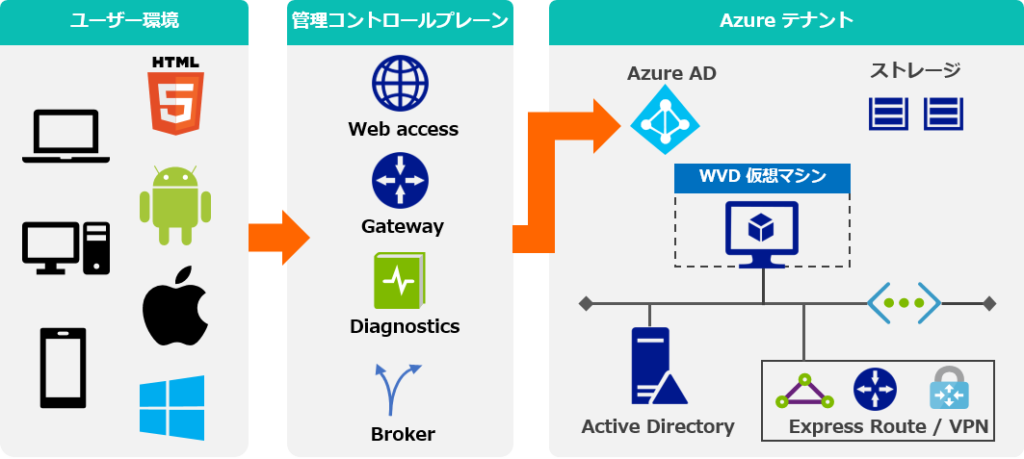

Remote access has become an important part of modern business computing. Employees, developers, administrators, and organizations increasingly need to connect to Windows-based applications and desktops from different locations. A Windows VPS can provide a flexible environment for these requirements, while Remote Desktop Services (RDS) can make remote access more practical for multiple users. However, organizations must also understand licensing requirements, including the role of a Windows VPS RDS CAL.
Understanding how Windows VPS, Remote Desktop Services, and client access licensing work together can help businesses build a remote computing environment that is convenient, secure, and properly licensed.
What Is a Windows VPS?
A Windows VPS, or Windows Virtual Private Server, is a virtualized server running a Windows operating system. It operates within a larger physical server but provides dedicated virtual resources such as processing power, memory, storage, and network access.
Unlike a traditional physical server, a VPS can generally be provisioned quickly and adjusted according to changing requirements. Businesses can use Windows VPS environments for hosting applications, running business software, development projects, remote administration, and other workloads.
One important advantage is accessibility. Administrators can connect to a Windows VPS remotely and manage its desktop environment or installed applications without being physically present at the server location.
For organizations with distributed teams, this flexibility can make centralized computing easier to manage.
Understanding Windows VPS RDS CAL
A Windows VPS RDS CAL is associated with licensing access to Microsoft’s Remote Desktop Services. RDS allows users to interact with a Windows Server environment remotely, but using RDS functionality for multiple users generally involves licensing considerations.
RDS CAL stands for Remote Desktop Services Client Access License. It provides the licensing rights required for users or devices to access certain Remote Desktop Services functionality.
There are different licensing models and requirements, so businesses should determine whether a User CAL or Device CAL model is appropriate for their environment. A user-based model can make sense when individual employees access resources from multiple devices, while a device-based approach may be more suitable when several employees share the same workstations.
The exact licensing requirements depend on the Windows Server version, deployment configuration, and how the remote services are being used. Organizations should verify licensing requirements with Microsoft or an authorized licensing provider before deployment.
How Remote Desktop Services Supports Modern Work
Modern work environments are often distributed across offices, homes, and different geographic regions. RDS can provide a centralized approach to remote computing.
Instead of installing every business application on every employee’s computer, organizations can host applications or desktop sessions on a Windows Server environment. Users can then connect remotely when authorized.
This approach can provide several operational benefits:
- Centralized application management
- Easier software updates
- Consistent desktop environments
- Remote access for authorized employees
- Centralized data storage
- Simplified administration
For businesses with employees using different types of computers, centralized remote access can also reduce some compatibility challenges.
Why Licensing Matters
Remote access technology should not be separated from licensing considerations. A technically functional server does not automatically mean that its configuration meets Microsoft’s licensing requirements.
A Windows VPS provider may supply a Windows Server license for the operating system, but that does not necessarily mean all RDS access rights are included.
This distinction is particularly important for organizations that expect several users to connect through Remote Desktop Services.
Before purchasing a VPS plan, businesses should ask the provider which Windows Server licensing is included, whether RDS licensing is included, and what additional CAL requirements apply. Clear answers can help prevent unexpected licensing issues later.
Choosing the Right Windows VPS Environment
The technical specifications of a Windows VPS should match the workload. A simple administrative environment may need relatively modest resources, while a multi-user remote desktop environment can require substantially more CPU, RAM, storage, and network capacity.
RAM is especially important when several users operate applications simultaneously. Each active session consumes system resources, and demanding software can increase memory and processor requirements.
Storage also matters. Businesses working with databases, documents, development environments, or application files may need faster storage and additional capacity.
Network performance is another consideration. Remote desktop sessions depend on a reliable connection between users and the server. High latency or inconsistent connectivity can negatively affect the user experience.
Security for Remote Access
Remote access introduces security responsibilities that should not be overlooked. A Windows VPS exposed to the internet should be protected with appropriate security controls.
Strong passwords and multi-factor authentication, where supported, can reduce the risk associated with compromised credentials. Organizations should also apply Windows security updates regularly and remove unnecessary services.
Firewall configuration is another important layer. Administrators should limit access to necessary services and avoid exposing unnecessary ports to the public internet.
User permissions should also follow the principle of least privilege. Employees should receive only the access required for their responsibilities.
Monitoring login activity can help administrators identify unusual access patterns and respond to potential security incidents.
Improving the Remote User Experience
A good remote desktop environment involves more than server specifications. The quality of the user experience depends on network conditions, server performance, application configuration, and session management.
Administrators can improve performance by removing unnecessary background applications, optimizing resource allocation, and ensuring the VPS has adequate CPU and memory.
For organizations supporting many users, monitoring resource utilization can reveal when the server is approaching capacity. This information can help administrators determine whether additional resources or a different architecture is necessary.
Remote access policies should also be clearly documented. Users should know how to connect, what resources they can access, and whom to contact when problems occur.
Windows VPS for Remote Teams
A Windows VPS can be useful for businesses with remote employees, contractors, and distributed teams. Centralizing applications and data can make administration more consistent while allowing authorized users to work from different locations.
For example, a company may maintain a Windows Server environment where employees access approved business applications through remote sessions. Administrators can manage the applications centrally rather than maintaining separate installations on every computer.
However, businesses should evaluate data protection, licensing, performance, and security requirements before adopting this model.
Planning for Scalability
Remote access requirements can change as a business grows. A VPS that works well for a small number of users may not provide sufficient resources when the number of simultaneous sessions increases.
Planning ahead can make expansion easier. Organizations should monitor CPU usage, memory consumption, storage capacity, network performance, and the number of active sessions.
Licensing should also be considered during expansion. Adding users or devices may affect the number or type of CALs required.
A scalable approach helps businesses avoid treating remote access as a temporary solution and instead build an environment that can support future operational needs.
Final Thoughts
Windows VPS technology and Remote Desktop Services provide organizations with flexible ways to support modern remote work. A Windows VPS can offer centralized computing resources, while RDS can provide authorized users with remote access to applications and Windows environments.
Understanding Windows VPS RDS CAL requirements is an important part of planning such a deployment. Licensing should be evaluated alongside server specifications, security, network performance, user requirements, and future growth.
With careful planning and appropriate licensing, organizations can create a remote access environment that is easier to manage and better aligned with their operational needs.